

cTRAIN is computer-based software (format) that can effectively teach the widest possible audience from people with no education (0 years) to college graduates, without trainer intervention in 99% of cases. License cTRAIN and Builder to create your own training titles for PC and Mac (no internet required) or via web delivery or to modify/tailor a training title built in cTRAIN for your organization.
- The cTRAIN format produces superior learning (“large” effect sizes of d = 0.9 – 3.15, greater than typical training results of d= 0.6) as demonstrated in our peer-reviewed scientific publications
- cTRAIN has been used in many industries and ratings/reaction has been very positive as shown on our populations and reaction page
- Content specialists can create training using text, pictures, recordings, and movies; or NwETA can create the training for you
- cTRAIN presents required information as well as optional non-required information (for the curious) that does not slow progress of those not so curious
- Programming is NOT required to use cTRAIN or create new training
- Try out our cTRAIN Demo in the online shop to see how it works online (check for current browser versions supported)
- The two screen formats (simple and original) are shown below. Screen colors can be set to any web-safe colors. The colors and format of the Navigation Bar at the bottom cannot be changed.
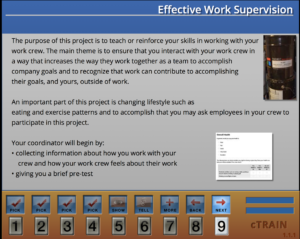
Simple screen format
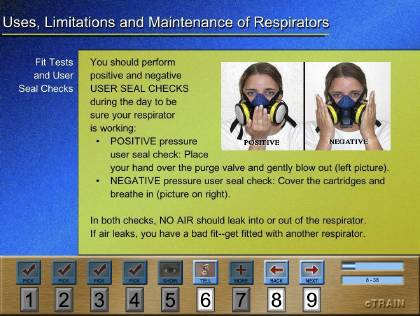
Original screen format
How would you use cTRAIN?
- Titles (e.g., Work-family balance, GHS) are available for purchase (formally licensing) by direct deposit, check, PO or by credit card through our online store (on this site)
- You can hire us to create a title for you – this is priced on our online store (we prefer a check or purchase order)
- You can create your own titles using our Builder software, and then use them in your organization or distribute them as a vendor
cTRAIN: Detailed Description
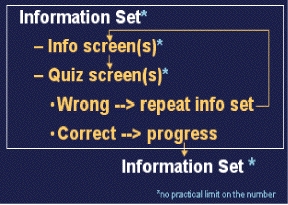
cTRAIN is structured as a series of building blocks, termed “information sets” or “info sets” (see flow diagram, right). Info sets consist of one or more screens of information followed by one or more “quiz” questions about the information.
- Information set screens can accommodate a limited amount of text and several still digital photos, sound recordings (for spoken text), and a movie
- Quiz questions are in multiple choice format with 2-4 possible answers (including yes or no). Correct answers to each quiz question in an info set are required to progress to the following info set. An error returns the trainee to the first screen in the info set which the trainee must step through again and give a correct answer on the same quiz item before proceeding. If there are two or more quiz questions and the trainee answers the first quiz question correctly but the second one wrong, they will repeat the information screens and return to the question they missed (they do not have to answer the question they got right again).
- Each information set screen has: (a) title, (b) a sub-head to describe the content, (c) text, and (d) a representation of the 9 response buttons plus icons depicting the function of each button, on the bottom of every screen (example below)
- As depicted in the example screen, each button has specific functions: (a) Buttons 1-4 are for answers to quiz questions; (b) 5 > “show” a movie or enlarge a picture; (c) 6 > “tell” or speak the text; (d) 7 >”more” or supplementary material; (e) 8 > step back one screen; and (f) 9 > step forward to the next screen
- The boxes in the lower right of the screen inform the trainee: (a) number of screens completed and to go, and (b) a visual representation of progress
- Completion of the content is followed by a Post-test. A pre-test option can present questions prior to beginning training and to provide a test-out option
- Data Reports are generated in a standard spreadsheet, including: (1) Summary report that lists totals and percent correct totals, (2) Detailed report that includes all trainee responses to track every event during the training, and (3) Tag report that lists performance by test question category (eg, percent correct on questions on labels, on questions on storage, on questions on transport of hazardous substances, and so on). The reports, which are generated by a single click, aggregate data on all trainees in the folders you select. The tag data reports offer a real time feedback option that can tell the trainee that they need to get additional training (for example repeat the training) on a particular topic or area of information.
- Other cTRAIN Features
> Restart at same location if trainee exits training or after a power failure (crash recovery should your computer crash)
> Add Employee Number/Participant ID input option
> Batch output data files to Excel
> Set pass/fail and optional testout percentages in Builder
> 1-click to reveal errors and correct responses after final test (optional)
> 1-click generation of a Word document that contains all the training screens and pictures on those screens, useful for documentation of the training and for feedback during the training creation or editing when working with a team
> Location of movies on Vimeo to maintain cognizance of browser changes and certain delivery regardless of browser and delivery around the world from the web due to widely-positioned satellites. Note that we, like every vendor, do not deliver movies on Internet Explorer 7
> Optional movie settings to require viewing first time on a screen only one time, or every time the trainee arrives at the screen; other options available
> Secure (encrypted) upload, resident on server and download of data
> Organized title upload/download options to unique, your-company-only NwETA server space to facilitate multiple developer input during title creation
cTRAIN titles are delivered on the web (see current browser versions supported); it can be delivered on computers offline for an additional cost.
Builder is an intuitive editing program that a content expert can use to create and enter content in cTRAIN titles, or modify them at any time. Builder creates both the desktop and web versions of a title. Builder is available for Macintosh 10.4 or above. It can create titles for PC (Windows) or Macintosh computers/operating systems and web delivery runs on current and recent versions of all popular browsers.
This cost is for the development of the training title (ie, the training content). A license is required to distribute the training title, based on the estimated number of people who will use your title. Contact NwETA for specific costs.
Click here to learn about:
• Builder
• creating your own training titles or modifying an existing title (e.g., a title that is already created and possibly in use).
• having NwETA create or modify a title for you